 skills for everything
t3-env-validation
Type-safe environment variable validation with @t3-oss/env-nextjs and Zod. Build-time validation ensures all required env vars are present and correctly typed.
SKILL.md
| Name | t3-env-validation |
| Description | Type-safe environment variable validation with @t3-oss/env-nextjs and Zod. Build-time validation ensures all required env vars are present and correctly typed. |
🚀 Next.js Szumplate


An enterprise-ready Next.js template that accelerates your development workflow
Features • Getting Started • Documentation • Deployment
</div>👋 Hello there!
This is Next.js Szumplate, an open-source template for enterprise projects! It is packed with features that will help you create an efficient, maintainable, and enjoyable application. This template will save you a lot of time, so sit back, relax, and get ready to conquer the whole world with your new awesome app!
✨ Features
🏗️ Core Technologies
- ⚡ Next.js - Fast by default, with config optimized for performance
- 💅 Tailwind CSS - A utility-first CSS framework
- 🛠️ Extremely strict TypeScript - With
ts-resetlibrary for ultimate type safety - 🎯 Absolute imports - No more spaghetti imports
🧪 Testing & Quality
- 🧪 Vitest - Rock-solid and highly speed unit and integration tests
- 🧬 React Testing Library - Component testing
- 🎭 Playwright - End-to-end tests with smoke testing and acceptance tests
- 📚 Storybook - Create, test, and showcase your components
- ✨ ESLint & Prettier - Clean, consistent, and error-free code
🤖 Automation & DevOps
- 🚀 GitHub Actions - Pre-configured workflows for CI/CD
- 🚢 Semantic Release - Automated versioning and changelog generation
- 🤖 Dependabot - Automated dependency updates
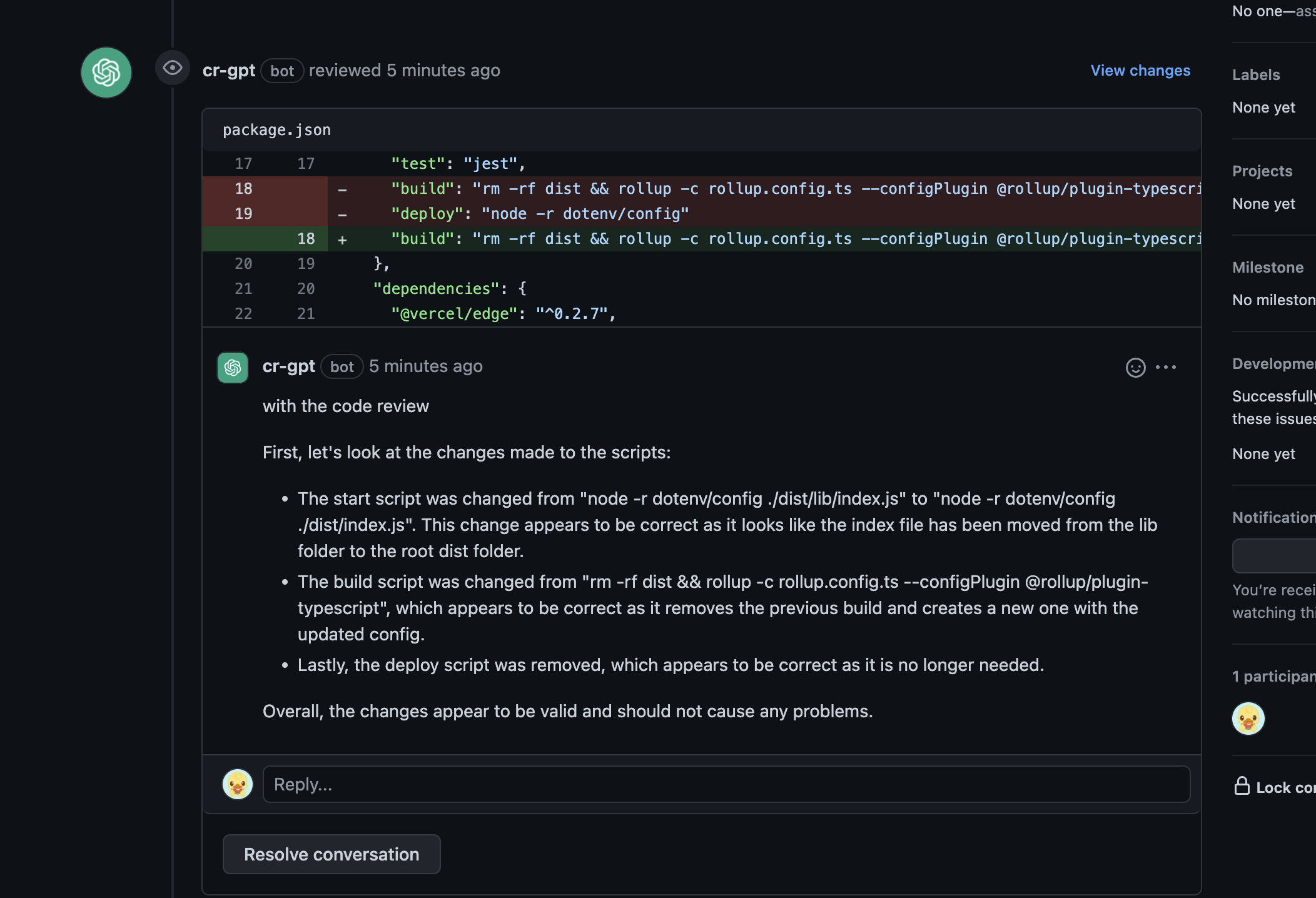
- 🧠 ChatGPT Code Reviews - AI-powered code reviews
🔧 Developer Experience
- 💻 T3 Env - Type-safe environment variables management
- 📊 Bundle Analyzer - Keep an eye on your bundle size
- ⚕️ Health Checks - Kubernetes-compatible for robust deployments
- 🎨 Szum-Tech Design System - Pre-built components and design tokens
- 📝 Pino - High-performance structured logging with development and production modes
🏆 Performance
- 💯 Perfect Lighthouse Score - Optimized for performance, accessibility, and SEO
📖 Table of Contents
- ✨ Features
- 📖 Table of Contents
- 🎯 Getting Started
- 🚀 Deployment
- 📃 Scripts Overview
- 🧪 Testing
- 🎨 Styling and Design System
- 🤖 ChatGPT Code Review
- 💻 Environment Variables Handling
- 📝 Logging
- 🚀 GitHub Actions
- 🔒 Keeping Server-only Code out of the Client Environment
- 📁 Project Structure
- 🤝 Contributing
- 📜 License
- 🙏 Acknowledgments
- 📧 Contact & Support
🎯 Getting Started
Prerequisites
Before you begin, ensure you have the following installed:
- Node.js (version 18.x or higher recommended)
- npm, yarn, or pnpm package manager
- Git for version control
Installation
Follow these steps to get started:
1. ⭐ Star and Fork the Repository
Don't forget to star ⭐ and fork the repository first!
2. 📥 Clone the Repository
git clone https://github.com/<your_username>/nextjs-szumplate.git
cd nextjs-szumplate
3. 📦 Install Dependencies
npm ci
4. ⚙️ Configure Environment Variables
Create a .env.local file in the root directory and add your environment variables:
# Add your environment variables here
# NEXT_PUBLIC_API_URL=your_api_url
5. 🚀 Start Development Server
npm run dev
Open http://localhost:3000 with your browser to see the result.
You can start editing the page by modifying app/page.tsx. The page auto-updates as you edit the file.
Optional Configuration
Semantic Release Setup
To use the fully configured Semantic Release feature:
- Go to
.github/workflows/publish.ymlfile - Expose hidden code (lines 26 to 30)
- Enjoy automated versioning and changelog generation (more details)
ChatGPT Code Review Setup
Add the OPENAI_API_KEY to your
GitHub Actions secrets to enable AI-powered code
reviews.
🚀 Deployment
Easily deploy your Next.js app with Vercel by clicking the button below:
Deployment Steps
- Click the "Deploy with Vercel" button
- Connect your GitHub repository
- Configure environment variables
- Deploy!
Your application will be live in minutes with automatic CI/CD pipeline.
📃 Scripts Overview
The following scripts are available in the package.json:
Development
npm run dev- Starts the development servernpm run build- Builds the app for productionnpm run start- Starts the production server
Code Quality
npm run lint- Lints the code using ESLintnpm run lint:ci- Lints the code for CI (treats warnings as errors)npm run lint:fix- Automatically fixes linting errorsnpm run prettier:check- Checks the code for proper formattingnpm run prettier:fix- Automatically fixes formatting issuesnpm run type-check- Runs TypeScript type checking
Testing
npm run test- Runs unit and integration testsnpm run test:ci- Runs tests for CI environmentnpm run test:coverage- Generates test coverage reportnpm run test:unit- Runs unit tests onlynpm run test:watch- Runs tests in watch modenpm run test:ui- Runs tests with UI
E2E Testing
npm run e2e- Runs end-to-end testsnpm run e2e:ci- Runs E2E tests for CInpm run e2e:ui- Runs E2E tests with Playwright UI
Storybook
npm run storybook:dev- Starts Storybook in development modenpm run storybook:build- Builds Storybook for productionnpm run storybook:serve- Serves the built Storybooknpm run test:storybook- Runs Storybook tests
Analysis
npm run analyze- Analyzes bundle sizes for Client, Server, and Edge environments
🧪 Testing
This template comes with a comprehensive testing setup to ensure your application's reliability and robustness.
Unit & Integration Tests
Run Vitest tests using:
npm run test
For watch mode:
npm run test:watch
Generate coverage report:
npm run test:coverage
End-to-End Tests
Run Playwright E2E tests:
npm run e2e
Run with UI for debugging:
npm run e2e:ui
Storybook Tests
Run Storybook component tests:
npm run test:storybook
Acceptance Tests
To write acceptance tests, we leverage Storybook's play function. This allows you to interact with your components and test various user flows within Storybook.
🎨 Styling and Design System
This boilerplate uses Tailwind CSS for styling and the Szum-Tech Design System, which contains:
- ✅ Fully designed components
- 🎨 Color palette and design tokens
- 🛠️ Utility functions and helpers
- 📖 Comprehensive documentation
Check the Design System Documentation
Usage Example
import { Button } from "@szum-tech/design-system";

export default function MyComponent() {
  return <Button variant="primary">Click me!</Button>;
}
🤖 ChatGPT Code Review
We've integrated the innovative ChatGPT Code Review for AI-powered, automated code reviews. This feature provides real-time feedback on your code, helping improve code quality and catch potential issues.
Setup
- Generate an API key from OpenAI Platform
- Add
OPENAI_API_KEYas a secret in your GitHub repository settings - The workflow will automatically run on every pull request
For detailed setup instructions, refer to the Using GitHub Actions section in the documentation.
💻 Environment Variables Handling
T3 Env provides type-safe environment variable management with build-time validation. It ensures that your application uses correct environment variables and their values are of the expected type.
Configuration
The config file is located at data/env/{client,server}.ts:
import { createEnv } from "@t3-oss/env-nextjs";
import { z } from "zod";

const env = createEnv({
  server: {
    // Server-side variables
    SECRET_KEY: z.string()
  },
  client: {
    // Client-side variables (must be prefixed with NEXT_PUBLIC_)
    API_URL: z.string().url()
  },
  runtimeEnv: {
    // Assign runtime variables
    SECRET_KEY: process.env.SECRET_KEY,
    API_URL: process.env.NEXT_PUBLIC_API_URL
  }
});

export default env;
Benefits
- ✅ Type-safe environment variables
- ✅ Build-time validation
- ✅ Runtime error prevention
- ✅ Auto-completion in your IDE
If required environment variables are not set, you'll get a clear error message:
❌ Invalid environment variables: { SECRET_KEY: [ 'Required' ] }
📝 Logging
This template uses Pino, one of the fastest and most popular logging libraries for Node.js, to provide structured logging throughout the application.
Features
- ✅ High Performance - Minimal overhead with extremely fast JSON logging
- ✅ Structured Logging - JSON-formatted logs for easy parsing and analysis
- ✅ Next.js Compatible - Optimized to work with Next.js App Router and Turbopack
- ✅ Universal Support - Works on both server-side and client-side (browser)
- ✅ Production Ready - JSON logs optimized for log aggregation tools (Datadog, ELK, CloudWatch)
- ✅ Request Tracking - Automatic request ID generation and logging via middleware
- ✅ Error Handling - Integrated with global error boundaries for comprehensive error logging
- ✅ Type-safe Configuration - LOG_LEVEL environment variable with TypeScript validation
Configuration
The logger is configured in lib/logger.ts and automatically adapts based on the environment:
Server-side (Node.js):
- Structured JSON output for both development and production
- ISO timestamps for consistency
- Includes PID and hostname in development mode
- Direct stdout logging for optimal performance
Client-side (Browser):
- Fallback to browser console with appropriate log levels
- Fatal/Error →
console.error() - Warn →
console.warn() - Info →
console.info() - Debug/Trace →
console.debug()
Technical Note: This implementation doesn't use pino-pretty transport to avoid worker thread issues with
Next.js/Turbopack. The logs remain fully structured and parseable as JSON, making them ideal for production environments
and log aggregation services.
Log Levels
Set the LOG_LEVEL environment variable to control verbosity:
# Available levels (from highest to lowest priority)
LOG_LEVEL=fatal  # Only fatal errors
LOG_LEVEL=error  # Errors and above
LOG_LEVEL=warn   # Warnings and above
LOG_LEVEL=info   # Info and above (default)
LOG_LEVEL=debug  # Debug messages and above
LOG_LEVEL=trace  # Everything including trace
Add to your .env.local:
LOG_LEVEL=debug
Usage Examples
Basic Logging
import logger from "~/lib/logger";

// Info level
logger.info("User logged in successfully");

// Warning
logger.warn("API rate limit approaching");

// Error with context
logger.error({ userId: "123", error: err }, "Failed to fetch user data");

// Debug information
logger.debug({ query: params }, "Database query executed");
Creating Context Loggers
Create child loggers with persistent context:
import { createLogger } from "~/lib/logger";

// Create a logger with specific context
const apiLogger = createLogger({
  module: "api",
  service: "user-service"
});

apiLogger.info("Processing request"); // Will include module and service in every log
API Route Logging
import { NextResponse } from "next/server";
import logger from "~/lib/logger";

export async function GET(request: Request) {
  logger.info("Fetching users list");

  try {
    const users = await fetchUsers();
    logger.debug({ count: users.length }, "Users fetched successfully");
    return NextResponse.json(users);
  } catch (error) {
    logger.error({ error }, "Failed to fetch users");
    return NextResponse.json({ error: "Internal server error" }, { status: 500 });
  }
}
Server Actions Logging
"use server";

import { createLogger } from "~/lib/logger";

const actionLogger = createLogger({ context: "server-action" });

export async function createUser(formData: FormData) {
  actionLogger.info({ action: "createUser" }, "Creating new user");

  try {
    // Your logic here
    actionLogger.info({ userId: newUser.id }, "User created successfully");
    return { success: true };
  } catch (error) {
    actionLogger.error({ error }, "Failed to create user");
    return { success: false, error: "Failed to create user" };
  }
}
Built-in Logging
The template includes automatic logging in several key areas:
1. Request Logging (middleware.ts)
Every HTTP request is automatically logged with:
- Request ID: Unique UUID for request tracing
- HTTP Method: GET, POST, PUT, DELETE, etc.
- URL: Full request URL
- User Agent: Client information
- Response Status: HTTP status code
- Duration: Request processing time in milliseconds
The X-Request-ID header is added to all responses for distributed tracing.
Example log output:
{
  "level": 30,
  "time": "2025-01-19T10:30:45.123Z",
  "requestId": "550e8400-e29b-41d4-a716-446655440000",
  "method": "GET",
  "url": "http://localhost:3000/api/users",
  "userAgent": "Mozilla/5.0...",
  "msg": "Incoming request"
}
2. Health Check API (app/api/health/route.ts)
The health check endpoint includes:
- Info-level logging when endpoint is called
- Debug-level logging with response details
- Error logging if health check fails
- Timestamp in response for monitoring
3. Global Error Handling
Page-level errors (app/error.tsx):
- Catches errors in specific pages/routes
- Logs error details including message, stack trace, and digest
- Provides user-friendly error UI with retry option
Application-level errors (app/global-error.tsx):
- Catches critical errors across the entire application
- Logs fatal errors with full context
- Last-resort error boundary for unhandled exceptions
Production Best Practices
- Use Structured Logging: Always include context objects for better searchability
// Good
logger.error({ userId, orderId, error }, "Order processing failed");

// Avoid
logger.error(`Order ${orderId} failed for user ${userId}`);
- Don't Log Sensitive Data: Never log passwords, tokens, or PII
// Bad
logger.info({ password: user.password }, "User login");

// Good
logger.info({ userId: user.id }, "User login");
-
Use Appropriate Log Levels:
error- Failures that need attentionwarn- Issues that don't stop executioninfo- Important business eventsdebug- Detailed diagnostic information
-
Include Error Objects: Always pass error objects for full stack traces
try {
  // code
} catch (error) {
  logger.error({ error }, "Operation failed"); // Captures full stack
}
Log Output Format
Logs are output in structured JSON format, making them easy to parse and search:
{
  "level": 30,
  "time": "2025-01-19T10:30:45.123Z",
  "pid": 12345,
  "hostname": "my-server",
  "msg": "User login successful",
  "userId": "user-123",
  "action": "login"
}
Log Levels (Pino standard):
10- trace20- debug30- info40- warn50- error60- fatal
Integration with Log Aggregation Services
The structured JSON output is compatible with all major log aggregation and monitoring services:
Cloud Platforms:
- Vercel: Built-in log streaming and filtering
- AWS CloudWatch: Works with Lambda, ECS, and EC2
- Google Cloud Logging: Compatible with Cloud Run, GKE, and App Engine
- Azure Monitor: Supports structured JSON logs
Log Management Services:
- Datadog: Direct Node.js integration available
- New Relic: Standard JSON log format supported
- Splunk: Can ingest and parse Pino JSON logs
- Sumo Logic: JSON log parsing built-in
Open Source:
- ELK Stack (Elasticsearch, Logstash, Kibana): Logstash can parse Pino format
- Grafana Loki: Supports JSON log ingestion
- Graylog: JSON input supported
Viewing Logs
Development:
npm run dev
# Logs appear in terminal as structured JSON
Production (Vercel):
vercel logs [deployment-url]
# Or view in Vercel Dashboard → Logs
Docker/Self-hosted:
# View container logs
docker logs [container-id]

# Stream logs in real-time
docker logs -f [container-id]

# Filter by log level (using jq)
docker logs [container-id] | jq 'select(.level >= 40)'
🚀 GitHub Actions
GitHub Actions offer multiple smooth workflows that make development easier and reduce the developer's impact on repetitive tasks.
Available Workflows
1. 🤖 ChatGPT Code Review (code-review.yml)
Provides AI-powered code reviews on every pull request.
2. ✅ PR Check (pr-check.yml)
Validates code on every pull request, checking:
- 🏗️ Build - Ensures the project builds successfully
- 🧹 Prettier - Code formatting validation
- ⬣ ESLint - Code quality and linting
- 🛠️ TypeScript - Type checking
- 🧪 Tests - Unit and integration tests
- 🎭 Playwright - E2E tests
3. 🚢 Publish (publish.yml)
Automatically triggered when changes are merged to the main branch:
- 📦 Determines next version using Semantic Release
- 📝 Updates
CHANGELOG.md - 🏷️ Creates GitHub release
- 🔢 Bumps version in
package.json
Based on Conventional Commits, this workflow uses @szum-tech/semantic-release-preset configuration.
🔒 Keeping Server-only Code out of the Client Environment
Since JavaScript modules can be shared between both Server and Client Components, it's possible for server-only code to accidentally be included in the client bundle.
Solution: server-only Package
Use the server-only package to give developers a build-time error if they accidentally import server code into a Client Component.
npm install server-only
Then import it in any module that contains server-only code:
import "server-only";

// The rest of your server-only code
export async function getData() {
  // This function can only be used on the server
}
📁 Project Structure
nextjs-szumplate/
├── .claude/              # Claude Code configuration (agents, skills, hooks)
├── .github/
│   └── workflows/        # GitHub Actions workflows (CI/CD)
├── .storybook/           # Storybook configuration
├── app/                  # Next.js App Router (pages, layouts, API routes)
├── components/           # Reusable React components (stories co-located)
├── constants/            # Static data and configuration constants
├── data/
│   └── env/              # T3 Env type-safe environment variables
├── features/             # Feature-based modules (components, schemas, server)
├── lib/                  # Utility functions and configurations (logger)
├── public/               # Static assets (images, fonts, icons)
├── tests/                # Test files
│   ├── e2e/              # Playwright end-to-end tests
│   ├── integration/      # Storybook integration test setup
│   └── unit/             # Vitest unit tests
├── .env.example          # Example environment variables template
├── eslint.config.mjs     # ESLint configuration
├── next.config.ts        # Next.js configuration
├── playwright.config.ts  # Playwright E2E test configuration
├── prettier.config.js    # Prettier configuration
├── proxy.ts              # Request logging middleware
├── release.config.js     # Semantic Release configuration
├── tsconfig.json         # TypeScript configuration
├── vitest.config.ts      # Vitest test configuration
└── package.json          # Project dependencies and scripts
Key Directories
.claude/- Claude Code configuration (agents, skills, hooks, project context).github/workflows/- CI/CD automation (code review, PR checks, releases).storybook/- Storybook setup for component development and documentationapp/- Next.js 16 App Router with server/client components, layouts, and API routescomponents/- Shared, reusable UI components with co-located storiesconstants/- Static data and configuration constantsdata/env/- T3 Env type-safe environment variable definitionsfeatures/- Feature-based modules with related components and logic (modular architecture)lib/- Utility functions, helpers, and third-party library configurationspublic/- Static files served directly (images, fonts, favicon, etc.)tests/e2e/- End-to-end tests using Playwright for full user flow testingtests/unit/- Unit tests using Vitest
Important Configuration Files
eslint.config.mjs- ESLint linting rules and pluginsnext.config.ts- Next.js framework configuration (build, plugins, Turbopack, etc.)playwright.config.ts- Playwright E2E testing configurationpostcss.config.js- PostCSS plugins and Tailwind CSS processingprettier.config.js- Code formatting rules and preferencesrelease.config.js- Semantic Release automation configurationtsconfig.json- TypeScript compiler options and path aliasesvitest.config.ts- Vitest unit test configuration and setup
🤝 Contributing
Contributions are welcome! If you'd like to contribute to this project:
- Fork the repository
- Create a feature branch (
git checkout -b feature/amazing-feature) - Commit your changes using Conventional Commits
- Push to the branch (
git push origin feature/amazing-feature) - Open a Pull Request
Please make sure your code passes all tests and follows the project's coding standards.
📜 License
This project is licensed under the MIT License. For more information, see the LICENSE file.
🙏 Acknowledgments
This template is built with amazing tools and libraries from the open-source community:
- Next.js - The React Framework
- Tailwind CSS - Utility-first CSS framework
- TypeScript - JavaScript with syntax for types
- Vitest - Next generation testing framework
- Playwright - E2E testing framework
- Storybook - UI component explorer
- And many more amazing libraries!
📧 Contact & Support
If you have any questions, suggestions, or issues:
- 🐛 Open an issue
- ⭐ Star this repository
- 👨💻 Check out my GitHub profile
<div align="center">
Made with ❤️ by Szum-Tech
If this template helped you, please consider giving it a ⭐ on GitHub!
</div>